
Voice Agents
Build interactive voice experiences by combining Speech-to-Text, NLU, and Text-to-Speech. The endpoints below let you discover configured agents and obtain LiveKit session details to connect to an agent.
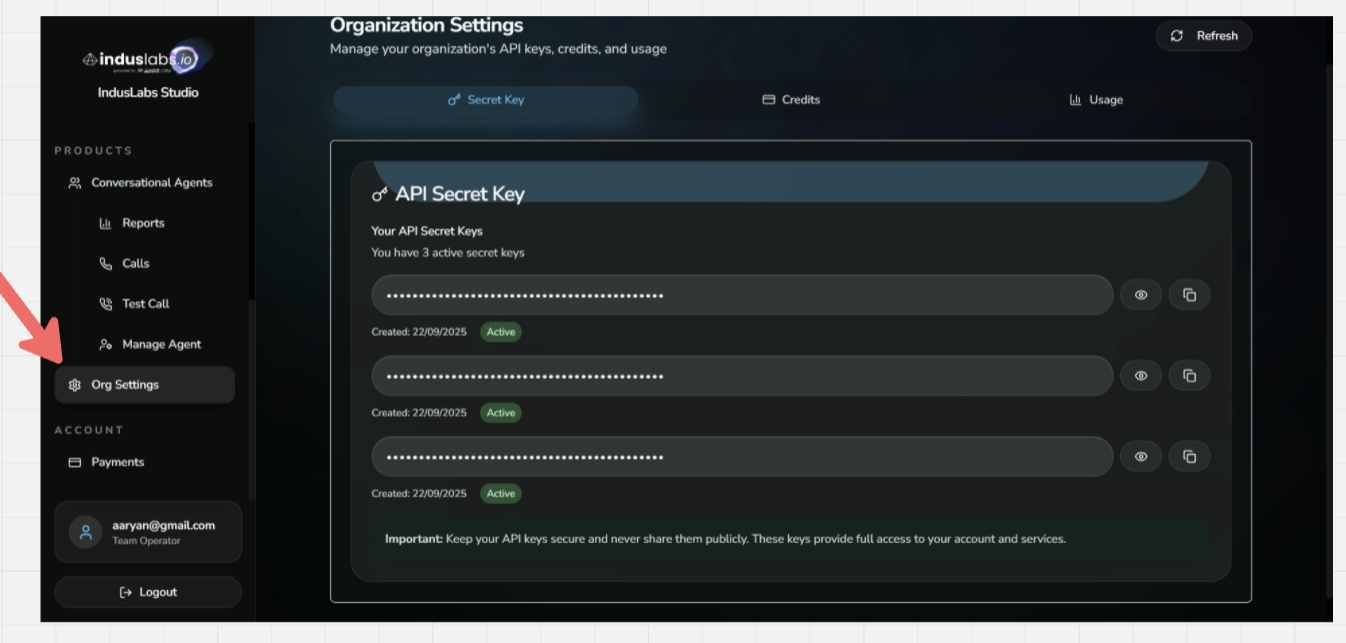
Need an API Key? If you don't have an API key yet, you can create one here: https://playground.induslabs.io/register
Quick Start
POST
/api/agentsList Available Agents
Returns a list of configured voice agents available in the developer environment.
Functionality
- Discover configured agents for your organization or developer environment.
Inputs
| Name | Type | Default | Description |
|---|---|---|---|
api_key* | string | required | API key used for authentication. |
Outputs
| Status | Type | Description |
|---|---|---|
200 OK | application/json | List of agents and metadata. |
401 Unauthorized | application/json | Missing or invalid credentials. |
cURL
curl -N -X POST \
  "https://developer.induslabs.io/api/agents" \
  -H "accept: application/json" \
  -H "Content-Type: application/json" \
  -d '{"api_key":"YOUR_API_KEY"}'
Python
import requests

url = "https://developer.induslabs.io/api/agents"
payload = {"api_key": "YOUR_API_KEY"}

resp = requests.post(url, json=payload, headers={"Content-Type": "application/json"}, timeout=30)
resp.raise_for_status()
print(resp.json())
React + TypeScript
type Agent = { agent_id: string; name?: string };

const resp = await fetch("https://developer.induslabs.io/api/agents", {
  method: "POST",
  headers: { "Content-Type": "application/json", accept: "application/json" },
  body: JSON.stringify({ api_key: process.env.NEXT_PUBLIC_INDUS_API_KEY }),
});
if (!resp.ok) throw new Error("Failed to load agents");
const agents: Agent[] = await resp.json();
POST
/api/livekitStart / Connect LiveKit Session
Request LiveKit session details for a given agent so clients can join the voice session.
Functionality
- Returns a direct access token and host URL for LiveKit connection.
- Optional call input fields are forwarded to the LiveKit agent dispatch payload. Use the nested call_infields object for custom fields. Top-level custom fields are also accepted for compatibility.
- Do not put secrets in call_infields metadata. The api_key is only used for authentication and is not forwarded to LiveKit dispatch.
Inputs
| Name | Type | Default | Description |
|---|---|---|---|
api_key* | string | required | API key used for authentication. |
agent_id* | string | required | ID of the agent to connect to. |
call_infields | object | optional | Custom call input fields forwarded to the LiveKit agent dispatch payload, for example customer_name, phone_number, or crm_id. |
call_infields.* | string | number | boolean | object | optional | Arbitrary custom metadata fields. If the same key is sent both top-level and inside call_infields, the call_infields value wins. |
Outputs
| Status | Type | Description |
|---|---|---|
200 OK | application/json | LiveKit connection details and metadata. |
401 Unauthorized | application/json | Missing or invalid credentials. |
cURL
curl -N -X POST \
  "https://developer.induslabs.io/api/livekit" \
  -H "accept: application/json" \
  -H "Content-Type: application/json" \
  -d '{
    "api_key": "YOUR_API_KEY",
    "agent_id": "AGENT_ID",
    "call_infields": {
      "customer_name": "Aarav Sharma",
      "phone_number": "+919999999999",
      "crm_id": "CRM_123"
    }
  }'
Python
import requests

url = "https://developer.induslabs.io/api/livekit"
payload = {
    "api_key": "YOUR_API_KEY",
    "agent_id": "AGT_E882B100",
    "call_infields": {
        "customer_name": "Aarav Sharma",
        "phone_number": "+919999999999",
        "crm_id": "CRM_123",
    },
}

resp = requests.post(url, json=payload, headers={"Content-Type": "application/json"}, timeout=30)
resp.raise_for_status()
print(resp.json())
React + TypeScript
import { Room } from "livekit-client";

// Step 1: Get LiveKit credentials from Indus Labs API
const resp = await fetch("https://developer.induslabs.io/api/livekit", {
  method: "POST",
  headers: { "Content-Type": "application/json", accept: "application/json" },
  body: JSON.stringify({
    api_key: process.env.NEXT_PUBLIC_INDUS_API_KEY,
    agent_id: "AGENT_ID",
    call_infields: {
      customer_name: "Aarav Sharma",
      phone_number: "+919999999999",
      crm_id: "CRM_123"
    }
  }),
});
if (!resp.ok) throw new Error("Failed to start LiveKit");
const response = await resp.json();
const { token, livekit_host_url } = response.data || response;

// Step 2: Connect to LiveKit room
const room = new Room();

// IMPORTANT: Force WebSocket protocol (wss://) to prevent HTTP validation 404s
let host = livekit_host_url;
if (host.startsWith('https://')) host = host.replace('https://', 'wss://');
else if (host.startsWith('http://')) host = host.replace('http://', 'ws://');
else if (!host.startsWith('ws')) host = 'wss://' + host;

await room.connect(host, token);
// add RoomEvent listeners and enable microphone as needed
React + TypeScriptIntegrate with LiveKit
Example of fetching agents, requesting a LiveKit session for one agent, and connecting to the room from a React app.
Install LiveKit client
npm install livekit-client
React + TypeScript component
import { useEffect, useMemo, useState } from "react";
import { Room, RoomEvent, createLocalAudioTrack } from "livekit-client";

const API_BASE = "https://developer.induslabs.io/api";
const API_KEY = "YOUR_API_KEY"; // Prefer an env var like process.env.NEXT_PUBLIC_INDUS_API_KEY

type Agent = { agent_id: string; name?: string };
type LivekitSession = { url: string; token: string };

async function fetchAgents(): Promise<Agent[]> {
  const res = await fetch(`${API_BASE}/agents`, {
    method: "POST",
    headers: { "Content-Type": "application/json", accept: "application/json" },
    body: JSON.stringify({ api_key: API_KEY })
  });
  if (!res.ok) throw new Error("Failed to load agents");
  const data = await res.json();
  // Handle response format: { data: { agents: [...] } }
  return data.data?.agents || data.agents || [];
}

async function startLivekit(agentId: string): Promise<LivekitSession> {
  // Step 1: Get LiveKit credentials from Indus Labs API
  const res = await fetch(`${API_BASE}/livekit`, {
    method: "POST",
    headers: { "Content-Type": "application/json", accept: "application/json" },
    body: JSON.stringify({
      api_key: API_KEY,
      agent_id: agentId,
      call_infields: {
        customer_name: "Aarav Sharma",
        phone_number: "+919999999999",
        crm_id: "CRM_123"
      }
    })
  });
  if (!res.ok) throw new Error("Failed to start LiveKit");
  const response = await res.json();
  const data = response.data || response;

  // Extract token and host URL
  const { token, livekit_host_url } = data;

  if (!token || !livekit_host_url) {
    throw new Error("Missing token or livekit_host_url in response");
  }

  return { url: livekit_host_url, token };
}

export function VoiceAgentLivekit() {
  const [agents, setAgents] = useState<Agent[]>([]);
  const [room, setRoom] = useState<Room | null>(null);
  const [status, setStatus] = useState("idle");

  useEffect(() => {
    fetchAgents().then(setAgents).catch(console.error);
  }, []);

  const connect = useMemo(
    () => async (agentId: string) => {
      try {
        setStatus("connecting");
        const { url, token } = await startLivekit(agentId);
        const lkRoom = new Room();

        lkRoom.on(RoomEvent.Connected, async () => {
          setStatus("connected");
          // Enable microphone to send audio to agent
          try {
            const audioTrack = await createLocalAudioTrack();
            await lkRoom.localParticipant.publishTrack(audioTrack);
          } catch (err) {
            console.error("Failed to enable microphone:", err);
          }
        });

        lkRoom.on(RoomEvent.Disconnected, () => {
          setStatus("disconnected");
        });

        // Subscribe to remote audio tracks (agent's voice)
        lkRoom.on(RoomEvent.TrackSubscribed, (track, publication, participant) => {
          if (track.kind === "audio") {
            const audioElement = track.attach();
            audioElement.setAttribute('autoplay', 'true');
            audioElement.setAttribute('playsinline', 'true');
            document.body.appendChild(audioElement);
            audioElement.play().catch(err => {
              console.warn('Autoplay blocked:', err);
            });
          }
        });

        // Connect with correct protocol handling
        let connectUrl = url;
        if (connectUrl.startsWith('https://')) connectUrl = connectUrl.replace('https://', 'wss://');
        else if (connectUrl.startsWith('http://')) connectUrl = connectUrl.replace('http://', 'ws://');
        else if (!connectUrl.startsWith('ws')) connectUrl = 'wss://' + connectUrl;

        await lkRoom.connect(connectUrl, token);
        setRoom(lkRoom);
      } catch (err) {
        console.error("Connection failed:", err);
        setStatus("error");
      }
    },
    []
  );

  useEffect(() => {
    return () => room?.disconnect();
  }, [room]);

  if (!agents.length) return <p>Loading agents...</p>;

  return (
    <div>
      <p>Status: {status}</p>
      {agents.map((agent) => (
        <button key={agent.agent_id} onClick={() => connect(agent.agent_id)}>
          Join {agent.name || agent.agent_id}
        </button>
      ))}
    </div>
  );
}
The /api/livekit response includes the token and livekit_host_url needed to connect. Supply your API key via environment variables in production.